Private beta · Early access
Platform
Code mode
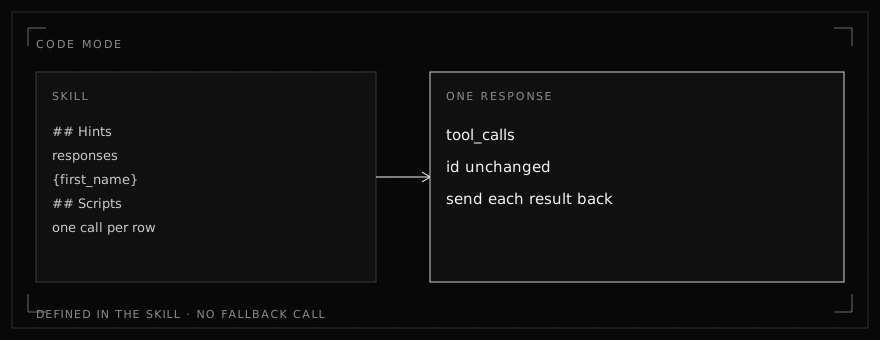
Prepared responses and scripts in a skill come back as tool calls, without a call to your fallback model.
Private beta. InferenceIndex is changing fast. Models, endpoints, pricing and these docs may change without notice, so check back before you build on a detail.
A skill can name wording and writes ahead of time. Code mode fills them from the request and from tool results, and sends them back as tool_calls. Send each result back with its tool call id unchanged. Wording the skill does not define still goes to your fallback model.
Prepared responses
Put a responses array in the skill's ## Hints section, in a fenced JSON block. Each item is wording for a text field, with {slot} placeholders. A slot name is letters, digits, and underscores.
| Field | What it is |
|---|---|
field | tool.field, or a bare field name such as body. A bare name matches that field on every tool. Matching ignores case and punctuation. |
text | The wording, with {slot} placeholders. Required. |
name | Optional short name, such as welcome or decline. |
part | Optional. true marks a section that can be included or left out. |
Sections are joined in the order they are written, with a blank line between them. A response that is not a section is sent whole.
A values or compute hint belongs in the same ## Hints block. Scripts do not: they have their own section, below.
A SKILL.md
---
name: welcome
description: Welcome a contact by email.
---

1. Find the contact.
2. Email a welcome.

## Hints

```json
{
  "responses": [
    {
      "field": "send_email.body",
      "name": "welcome",
      "text": "Hi {first_name}, welcome aboard. Your plan is {plan}."
    },
    { "field": "body", "name": "greeting", "part": true, "text": "Hi {first_name}," },
    { "field": "body", "name": "thanks", "part": true, "text": "Thanks for joining." },
    { "field": "body", "name": "upsell", "part": true, "text": "Ask us about Pro." }
  ]
}
```
A call
The contact tool returned [{ "id": "c-7", "name": "Ana Lima", "email": "ana@example.com", "plan": "Starter" }], and the request was "Welcome ana@example.com by email." The welcome response can come back as one tool call:
{
  "tool_calls": [
    {
      "id": "call_…",
      "type": "function",
      "function": {
        "name": "send_email",
        "arguments": "{\"to\":\"ana@example.com\",\"body\":\"Hi Ana, welcome aboard. Your plan is Starter.\"}"
      }
    }
  ]
}
Send the tool result back with that id unchanged. Chosen sections come back the same way. Hi {first_name}, and Thanks for joining. become Hi Ana, then a blank line, then Thanks for joining.
How a slot is filled
Each {slot} is filled as a text field of that name, from the request and from tool results.
- The same name. A result value stored under that name is used.
first_name,firstName, andFirst Nameare the same name. first_nameandlast_name. The first or last word of a full name in the results is used.Ana Limafills{first_name}withAna.- An id. A slot whose name is an id, such as
ticket_id, is filled from ids in the results: a value namedid, or a name ending in_idorId. - A date. A slot whose name is a date, time, deadline, or due date, or that ends in
start,end,until, orat, is filled from dates in the request and the results. A name that is a zone, index, status, count, page, or type is not a date. - An email. A slot named like an email (
email,to,cc,bcc,from, or a name ending inrecipientorsender) is filled from addresses in the request and the results. - Hints. A
valueshint (values,pattern, orcolumn) or acomputehint whosefieldis the slot name, and which names no tool, fills that slot. A figure per row is taken from the row the rest of the message names.
If a slot has no fitting value, no section is chosen, or the field needs fresh wording, that field goes to your fallback model. Nothing is guessed to fill the gap.
Scripts
Put a ## Scripts section after the steps, in its own fenced JSON block. The block is a list of scripts, or an object with scripts and, when you need them, params.
A parameter is a figure the request may set, such as a threshold. Formulas read it by name, like a column.
| Field | What it is |
|---|---|
is | What the value is. Required. |
default | A number or text, used when the request states none and read finds none. Required. |
read | Optional formula over what the run has read. Used when the request states none. |
pattern | Optional regular expression. Its matches in the request are offered. For a number with no pattern, the numbers written in the request are offered. |
options | Optional numbers or texts always offered beside the default. |
{
  "critical_percent": {
    "is": "the percent of budget above which a campaign is critical",
    "default": 110
  }
}
Each script makes whole calls of one tool. List scripts in the order of the steps. One listed earlier runs before the tool chosen later, when it can already make its calls.
| Field | What it is |
|---|---|
name | What the script does. Unique in the skill. |
tool | The tool it calls. |
let | Optional. Names and formulas worked out for each row first, then read like columns. |
where | Optional. Which rows count. |
per | Optional. One call per value of this formula. Aggregates in args run over that group. |
once | Optional. true makes one call over all the rows. Do not set per and once together. |
args | A value for each argument. A string is a formula. { "template": "Total: {text(sum(Cost), '$#,##0.00')}" } is text with formulas in braces. Any other JSON is itself, and strings inside it are formulas. A fixed text is a quoted formula, such as 'No'. Double a brace when you want a brace in the text. |
repeat | Optional. true runs the script each time its tool is chosen, over everything read so far, and does not repeat a call already made. |
exclusive | Optional. false when the tool also has calls the scripts do not make. By default, once every script for a writing tool has run and its calls worked, choosing that tool again makes no call. A read (a name with get, find, list, search, read, lookup, fetch, retrieve, or query) is left to run again. |
from | Optional. Rows only from this tool's results. |
key | Optional. A column that names a record. Only its latest version counts. |
A row that cannot make a valid call is skipped. A value the formula cannot fill does not produce a call.
Limits
A script makes at most 50 calls per turn. Rows past that are skipped. A script runs once per run, unless repeat is true.
Commission emails
This skill records a commission on each won deal, emails each rep, and emails payroll the total. The deals are Ana $10,000 won, Ben $4,000 lost, Ana $2,500 won, and Cy $8,000 won. The request says to send the totals to payroll@example.com.
# Commissions

Pay commissions.

1. Read the deals.
2. Record each commission.
3. Email each rep.
4. Email payroll.

## Scripts

```json
{
  "scripts": [
    {
      "name": "record each won deal's commission",
      "tool": "update_deal",
      "let": { "commission": "round(Value * 0.05, 2)" },
      "where": "Status == 'Won'",
      "args": {
        "row_id": "row_id",
        "cells": { "Commission": "text(commission, '$#,##0.00')", "Paid": "'No'" }
      }
    },
    {
      "name": "email each rep their commission",
      "tool": "send_email",
      "let": { "commission": "round(Value * 0.05, 2)" },
      "where": "Status == 'Won'",
      "per": "Email",
      "args": {
        "to": "Email",
        "subject": "'Your commission'",
        "body": {
          "template": "Hi {Rep}, {count()} won deal(s):\n{lines(Value)}\nCommission: {text(sum(commission), '$#,##0.00')}"
        }
      }
    },
    {
      "name": "email payroll the totals",
      "tool": "send_email",
      "once": true,
      "let": { "commission": "round(Value * 0.05, 2)" },
      "where": "Status == 'Won'",
      "args": {
        "to": "search('[\\w.]+@[\\w.]+')",
        "subject": "'Commission totals'",
        "body": {
          "template": "{lines(if(first_by(Rep), Rep + ': ' + text(sum_by(commission, Rep), '$#,##0.00'), null))}\nTotal: {text(sum(commission), '$#,##0.00')}"
        }
      }
    }
  ]
}
```
Choosing update_deal comes back as several tool calls in one response. A required argument the script leaves out is null when the schema allows null.
{
  "tool_calls": [
    {
      "id": "call_…",
      "type": "function",
      "function": {
        "name": "update_deal",
        "arguments": "{\"row_id\":\"2\",\"cells\":{\"Commission\":\"$500.00\",\"Paid\":\"No\"},\"sheet\":null}"
      }
    },
    {
      "id": "call_…",
      "type": "function",
      "function": {
        "name": "update_deal",
        "arguments": "{\"row_id\":\"4\",\"cells\":{\"Commission\":\"$125.00\",\"Paid\":\"No\"},\"sheet\":null}"
      }
    },
    {
      "id": "call_…",
      "type": "function",
      "function": {
        "name": "update_deal",
        "arguments": "{\"row_id\":\"5\",\"cells\":{\"Commission\":\"$400.00\",\"Paid\":\"No\"},\"sheet\":null}"
      }
    }
  ]
}
Send each result back with its id unchanged. The rep emails are one response of two calls: Ana gets Hi Ana, 2 won deal(s): then $10,000 and $2,500 on their own lines, then Commission: $625.00. Cy gets the same for $8,000 and Commission: $400.00. The payroll email is the next send_email response: Ana: $625.00 and Cy: $400.00 on their own lines, then Total: $1,025.00, to payroll@example.com.
Formula reference
Columns are bare words (Cost) or in backticks. Text is in single quotes. +, -, *, and / do arithmetic, and + joins text when either side is not a number. Comparisons are ==, !=, <, <=, >, and >=. ~ matches a regular expression, ignoring case. and, or, and not combine tests. A cell written 6% is the number 6, and $1,200 is 1200. A format ending in % multiplies by 100.
| Function | What it returns |
|---|---|
sum(x) | The sum of x over the rows |
avg(x) | The average of x |
min(x), max(x) | The least or greatest. One argument reads the rows. Several arguments are those values. |
count() or count(x) | How many rows, or how many where x is set |
top(x, by), bottom(x, by) | x from the row with the greatest or least by |
list(x) | The values of x, once each, joined with a comma |
lines(x) | Each row's x on its own line, repeats kept |
join(x, separator) | Each row's x joined by the separator, repeats kept |
sum_by(x, key) | The sum of x over rows that share this row's key |
count_by(key) | How many rows share this row's key |
first_by(key) | True on the first row with that key |
count_in(list, condition) | How many records in a list cell pass the condition. The condition is text. |
sum_in(list, value, condition) | The sum of value over records in a list cell that pass. value and condition are text. |
len(text) | How many characters |
today() | The request's today |
round(x, places), floor, ceil | x rounded |
abs(x) | The absolute value |
if(test, a, b) | a when test is set, otherwise b |
coalesce(a, b, ...) | The first value that is set |
match(text, regex) | The first match in text, or its first group |
search(regex) | The first match in the request or any result text, or its first group |
text(number, format) | The number written with a format such as $#,##0.00, #,##0, or 0.0% |
number(x) | x as a number |
lookup(column, keyColumn, key) | column from the record whose keyColumn matches key, ignoring case |
date(x) | x as YYYY-MM-DD |
date_add(date, days) | That many days later |
days_since(date), days_until(date) | Days from that date to today, or from today to that date |
days_between(a, b) | Days from a to b |